
NinTastic - Nintendo Style Case for the Raspberry Pi
Arrives damaged? Free reprint, just film the box being opened. Returns policy
About this print
A snap-together enclosure for the Raspberry Pi styled after a classic Nintendo home console. The case is designed for retro gaming setups running RetroPie or similar emulation software, letting the Pi sit in a form factor recognisable to fans of early home gaming. It prints in separate sections that assemble without fasteners. PLA is the standard choice for enclosures of this type, printing cleanly and producing a solid finished result.
From the original design page
Original maker's notes
By tastic007 on Thingiverse · CC-BY-SA
# NinTastic - Nintendo Style Case for the Raspberry Pi
* The NinTastic case for a Raspberry Pi prints in 3 pieces that can easily snap together:
1. Top
2. Bottom
3. Flap
* Alternative flap file without the NinTastic logo here also for convenience.
* Designed in [Tinkercad](http://www.tinkercad.com).
********
# NinTastic - Inputs and Outputs
The NinTastic case holds a [Raspberry Pi: Model B](http://www.amazon.com/gp/product/B009SQQF9C/) and is super easy to hookup. The inputs and outputs are:
## NinTastic - Inputs
* Micro-USB Power Cable - A good example I like to use is:
* [Amazon.com - Motorola Micro USB Charger (5V, 850mA) Model:SPN5504)](http://www.amazon.com/gp/product/B004EYSKM8/)
* SD card with RetroPie image. Example hardware I like to use:
* [Amazon.com: Samsung 32GB PRO SDHC](http://www.amazon.com/gp/product/B009SK57Z6/)
* [Amazon.com: Samsung 64GB PRO SDHC](http://www.amazon.com/Samsung-64GB-Pro-SDXC-MB-SGCGB/dp/B009SK57IS)
* USB Game Controller, example:
* [Amazon.com: SNES Retro USB Super Nintendo Controller](http://www.amazon.com/Retro-Nintendo-Controller-Not-Machine-Specific/dp/B0034ZOAO0/)
## NinTastic - Outputs
* HDMI output to TV. Example cable that fits the case well:
* [Amazon.com - AmazonBasics High-Speed HDMI Cable (6.5 Feet/2.0 Meters)](http://www.amazon.com/gp/product/B003L1ZYYM/)
********
## NinTastic - Inputs and Outputs - Images


# RetroPie - Raspberry Pi based Video Game System
This case was designed specifically in creating a RetroPie gaming system, which combines a number of video game emulator technologies into a single Raspberry Pi based solution.
## [RetroPie](https://github.com/petrockblog/RetroPie-Setup/wiki) - combines these technologies:
1. [Raspberry Pi](http://www.amazon.com/gp/product/B009SQQF9C/) - the hardware
2. [EmulationStation](https://github.com/petrockblog/RetroPie-Setup/wiki/EmulationStation) - the GUI menu that lets you browse between emulator systems (e.g. Nintendo, Sega Genesis, PlayStation 1, ...) and select ROMs to play. This then loads the correct emulator to play that ROM.
3. [RetroArch](http://lifehacker.com/5988944/retroarch-emulates-nearly-every-classic-gaming-console-on-android) - the emulator used by most systems within the RetroPie
4. [ES-Scraper](https://github.com/petrockblog/RetroPie-Setup/wiki/ES-scraper) - the game box cover art and information scraping utility.
********
## RetroPie - More Info:
* [Blog.petrockblock.com - RetroPie](http://blog.petrockblock.com/retropie/)
* [RetroPie - GitHub](https://github.com/petrockblog/RetroPie-Setup)
* [RetroPie - GitHub - Wiki](https://github.com/petrockblog/RetroPie-Setup/wiki)
* Downloads:
* [Blog.petrockblock.com - RetroPie SD Card Image Download](http://blog.petrockblock.com/download/retropie-project-image/)
* Advanced settings:
* [RetroPie - GitHub - Advanced Settings](https://github.com/petrockblog/RetroPie-Setup/wiki/Advanced-Configuration)
********
## RetroPie - Guides and Tutorials
* [RetroPie - GitHub - Wiki](https://github.com/petrockblog/RetroPie-Setup/wiki)
* [LifeHacker - How to Build an All-In-One Retro Game Console for $35](http://lifehacker.com/how-to-turn-your-raspberry-pi-into-a-retro-game-console-498561192)
* [Super Nintendo Pi - Beginners Guide to Installing RetroPie on a RaspPi](http://supernintendopi.wordpress.com/2013/01/23/an-a-to-z-beginners-guide-to-installing-retropie-on-a-raspberry-pi/)
* [RetroPie Project: Definitive Guide! - http://misapuntesde.com](http://misapuntesde.com/post.php?id=109)
* Related:
* [LifeHacker - How to Turn Your Android/iPhone into a Portable Retro Arcade](http://lifehacker.com/5849961/how-to-turn-your-android-or-iphone-into-a-portable-retro-game-arcade)
* [LifeHacker - How to Turn Your Computer into a Retro Game Arcade](http://lifehacker.com/5835259/how-to-turn-your-computer-into-a-retro-game-arcade)
* [LifeHacker - RetroArch Emulates Nearly Every Classic Gaming Console](http://lifehacker.com/5988944/retroarch-emulates-nearly-every-classic-gaming-console-on-android)
********
## EmulationStation - graphical front-end installed by RetroPie
### Menu that lets you switch between game systems (e.g. Nintendo, Sega, ...)
+ [RetroPie - EmulationStation](https://github.com/petrockblog/RetroPie-Setup/wiki/EmulationStation)
+ [Aloshi - GitHub - EmulationStation](https://github.com/Aloshi/EmulationStation)
+ [Aloshi - GitHub - EmulationStation - Themes](http://aloshi.com/emulationstation#themes)
+ Handles loading appropriate emulator core depending on which game you select. The major of systems end up running the RetroArch emulator
+ [RetroPie - Supported Game Emulators](https://github.com/petrockblog/RetroPie-Setup/wiki/Supported-Systems-Emulators)
+ [Emuparadise - BIOS Cores](http://www.emuparadise.me/biosfiles/bios.html)
+ [LifeHacker - RetroArch Emulates Nearly Every Classic Gaming Console](http://lifehacker.com/5988944/retroarch-emulates-nearly-every-classic-gaming-console-on-android)
+ [Wikipedia - List of Video Game Emulators](http://en.wikipedia.org/wiki/List_of_video_game_emulators)
+ Different splash screens you can pick from:
+ [RetroPie - SplashScreens](http://blog.petrockblock.com/forums/forum/retropie-project-forum/splashscreens/)
+ To change default splash screen, run:
+ `sudo /home/pi/RetroPie-Setup/retropie_setup.sh`
+ Pick **"3"** for Setup
+ Pick **7** for change splashscreen
+ I like: **7** - mysplashscreen
EmulationStation - Example Screenshots:


********
## ES-Scraper - the scraping script that identifies ROMs and downloads the box art, description, etc.
* [RetroPie - ES-scraper](https://github.com/petrockblog/RetroPie-Setup/wiki/ES-scraper)
* [GitHub - Elpendor - ES-scraper](https://github.com/elpendor/ES-scraper)
* Databases it uses:
* http://thegamesdb.net/
* http://archive.vg
* Fixing the ES-Scraper image grabbing (broken by default):
* [Topic - performance-issues-with-es-scraper - post-3402](http://blog.petrockblock.com/forums/topic/performance-issues-with-es-scraper/#post-3402)
* Replace the text **"PIL"** with **"Image"** on line 2 of scraper.py
* MAME rom scraping - Also, this dude is the man, made MAME worth it for the RetroPie:
* [Raspberry Pi - RetroPie Gamelist.xml and snapshots for MAME full romset](http://www.raspberrypi.org/phpBB3/viewtopic.php?t=53243&p=408376)
* [mame4allsnapsgamelist.zip](http://media-b596.firedrive.com/download/3/57/17193684c5c943cf4cb738a6063863a6?h=UQZIlnQTMXcLvvKXxsDsOw&e=1397559483&f=mame4allsnapsgamelist.zip&domain=firedrive.com)
* Compiled all art for that known MAME ROM torrent, and created gamelist.xml for you. Drag and drop into RetroPie MAME folder.
* Emulation Station - GameList.xml File Editting
* [mameGenXml.pl - Script to Generate Emulation Station GameList.xml Files](http://webspace.lenscritic.com/mame/)
* [Raspberry Pi - View topic - Script to generate Emulation Station xml (MAME/FBA/consoles)](http://www.raspberrypi.org/forums/viewtopic.php?f=78&t=70957)
* [ES-Manager - Scrape without ES Scraper - GameList.xml Editting Util](http://blog.petrockblock.com/forums/topic/scrape-without-es-scrapper/)
********
### More Image and Box Art Help
* [XnConvert - Free Batch Image editting and Converting Utility](http://www.xnview.com/en/xnconvert/#downloads)
* [EmuMovies DSU 2.00 - Massive Download Artwork, Instructions and So Much More](http://emumovies.com/forums/index.php/files/file/321-emumovies-dsu/)
* [EmuMovies - Supporting Member Packages](http://emumovies.com/forums/index.php/store/category/3-subscription-packages/)
* [EmuMovies CRC-32 Renamer - EmuMovies](http://emumovies.com/forums/index.php/files/file/663-emumovies-crc-32-renamer/)
* 
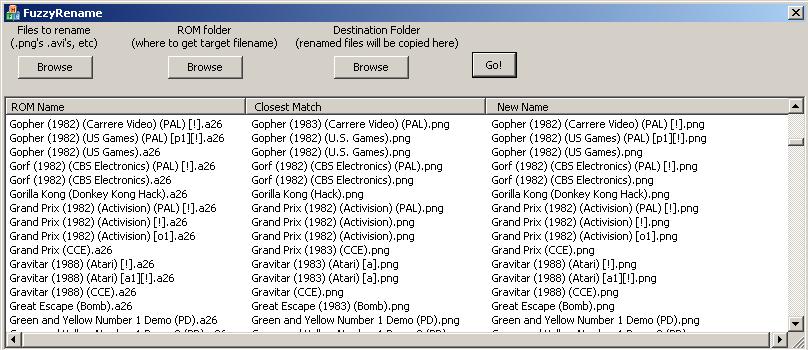
* [FuzzyRename - bunch of .png or .avi files that are similarly, but not quite exactly named to your ROM/zip file names](http://www.waste.org/~winkles/fuzzyRename/)
* [Fuzzy Rename - EmuMovies](http://emumovies.com/forums/index.php/files/file/45-fuzzy-rename/)
* 
********
# ROM – File Naming, Renaming, Organizing
## Cowering's GoodTools - ROM Renaming Tools
* Awesome tools, helps rename and organize ROMS.
* Rename ROMs to filenames that the scraper will pick up easier.
* Also separates based on US version, vs other, vs Good/Final.etc.
* ROM Filename Conventions:
* [alt.games.mame FAQ: About ROMS](http://www.dweasel.com/agmfaq/index-4.html)
* [ZSNES board - View topic - What do things like [h1C] mean?](http://board.zsnes.com/phpBB3/viewtopic.php?f=10&t=11990)
* [Whats h1C ??? - SNES Roms](http://www.epforums.org/showthread.php?47156-Whats-h1C-(SNES-Roms))
* [What does o1, h1, h2 and o3 mean? Archive - EmuTalk.net](http://www.emutalk.net/archive/index.php/t-4015.html)
* Download ALL – GoodTools - All neat and setup (which is a little bit of a pain otherwise):
* [Dropbox - Cowering-GoodTools-ROM_Renaming_and_Org.zip ](https://www.dropbox.com/s/m3tk4hoxsvo12hx/Cowering-GoodTools-ROM_Renaming_and_Org.zip?dl=0)
* Great overview and tutorial:
* http://bmgcl.atspace.cc/tutorials/GoodN64Tutorial.html
* More info:
* http://en.wikipedia.org/wiki/GoodTools
* [GoodTools - Main Site - www.allgoodthings.us](http://www.allgoodthings.us/)
* [GoodMerge](http://goodmerge.sourceforge.net/)
* [UnGoodMerge](http://www.users.on.net/~swcheetah/sam/)
* [GoodGUI - A Frontend for the GoodTools](http://polarz.home.mchsi.com/GoodGUI/)
* [Internet Archive - GoodGUI - A Frontend for the GoodTools ](http://web.archive.org/web/20130101050921/http:/polarz.home.mchsi.com/GoodGUI/)
* Downloads:
* [AllGoodThings - POST - GoodTools_Set_Dec_29_2013.zip](http://www.allgoodthings.us/search?updated-min=2013-01-01T00:00:00-06:00&updated-max=2014-01-01T00:00:00-06:00&max-results=5)
* [GoodTools_Set_Dec_29_2013.zip :: Copy](https://www.copy.com/s/rGMfL0QF4a6V/GoodTools_Set_Dec_29_2013.zip)
* [Download GoodTools_Set_July_9_2012.zip](http://www.sendspace.com/file/5hgfrp)
* 
********
## ROMS - Finding Game ROMs - Download Sites
+ [theoldcomputer.com - Worlds Largest Free ROM and Games Website](http://www.theoldcomputer.com/roms/)
+ [Emuparadise - Gaming ROMs and related](http://www.emuparadise.me/)
+ [CoolROM](http://coolrom.com/roms)
+ [NZBMatrix](http://nzbmatrix.com/)
+ [Demonoid](http://www.demonoid.me/)
+ [The Pirate Bay - thepiratebay.se](https://thepiratebay.se/)
********
# SD Card - RetroPie Image Help
## SD Card - RaspPi Image Writing/Reading Guidance
* General info about writing RaspPi images to an SD car
These notes continue on the original design page.
Formatting may have been simplified. These are the independent maker's instructions and fitment claims; Hark Tech has not independently verified them.
Printing NinTastic - Nintendo Style Case for the Raspberry Pi
For NinTastic - Nintendo Style Case for the Raspberry Pi we would normally reach for PLA — it is easy to print, low-odour and plenty strong for everyday use. We set the layer height, wall count, infill and supports to suit the model and how you will use it, and those choices are already priced into your instant quote. Want a specific colour or material? Tell us and we will match it where we can.
Model details
| Downloads at source | 36,626 |
|---|---|
| Likes at source | 4,570 |
| Original model | View on Thingiverse |
| Designer | tastic007 |
| Licence | CC-BY-SA |
More popular Thingiverse models


Got your own design?
You do not have to pick from the catalogue. Upload your own file and the price comes back in seconds, no quote form and no waiting on an email. Found a model on MakerWorld? Download the 3MF there and upload it here.
- STL, STEP and 3MF
- Priced from £4
- Free Tracked 48 over £40
- Printed in-house in Hampshire
Designing it yourself? We print from your CAD export too. Printing from CAD · Business and trade accounts