


K2 Printer Backup
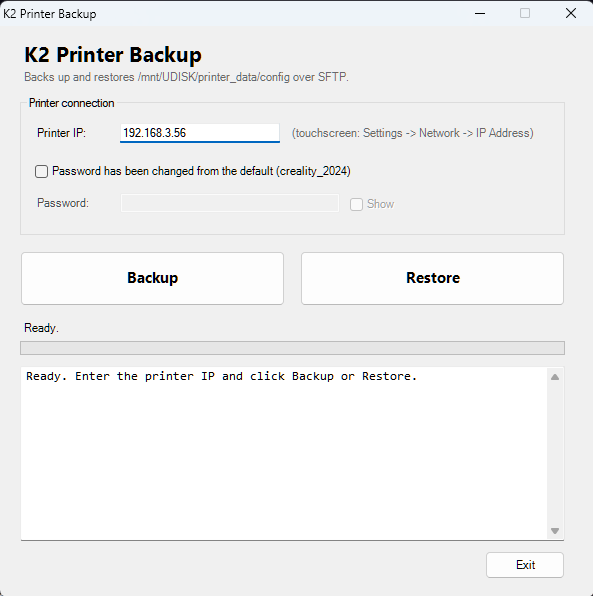
Free, open Windows app that backs up and restores your Creality K2's Klipper configuration over SFTP. One zip per backup, one-click restore, automatic Klipper restart afterwards. No print-data is touched.
What's in the zip
Backed up in one click
Everything in /mnt/UDISK/printer_data/config on the K2, captured into a single timestamped zip:
- printer.cfg
- macros.cfg
- KAMP_Settings.cfg
- saved_variables.cfg
- moonraker.conf
- custom *.cfg
- manifest.json
Features
What it does
Connects to your K2 over SFTP using the standard root login, pulls down everything in /mnt/UDISK/printer_data/config, printer.cfg, all macros, KAMP, custom .cfg files, and packs it into a single timestamped zip on whichever drive you choose. Each zip carries a small manifest noting which printer and when, so a restore can confirm what it's about to overwrite.
On restore, the same data goes back, and it offers to restart Klipper for you so the new config takes effect, via Moonraker's FIRMWARE_RESTART if reachable, or via the procd init script over SSH as a fallback. No full system reboot needed.
Why use it
- Saves you from "the touchscreen update wiped my macros".
- Backups travel as one zip, email it, drop it on a USB stick, sync it via Dropbox/OneDrive.
- Restore picks the zip with a normal Open File dialog, no folder-level confusion.
- Works on stock Creality K2 firmware. KAMP-K2, custom macros and other tweaks are all preserved.
- Open source. No account, no telemetry, no auto-update phoning home.
Get started
Quick start
-
Download and run
K2-Backup.exe. On first run the app will ask permission to install one free Windows PowerShell module (Posh-SSH), no admin rights needed, current user only. -
Find your printer's IP on the K2 touchscreen: Settings › Network › IP Address. Type it in. The default password (
creality_2024) is built in, tick the box if you've changed it. -
Click Backup, choose where to save, done. The zip is written to
K2-Backup_<ip>_<timestamp>.zip. To restore later, click Restore and pick the zip.
First launch, what to expect
The app is not yet code-signed, so on first launch Windows SmartScreen will say "Windows protected your PC". This is a generic warning shown for every unsigned executable from a small publisher, it doesn't mean anything's wrong with the file.
To launch: click More info › Run anyway. The app then checks for the Posh-SSH module and you're set.
If you'd like to verify the file is the one I published before running it, see “Verify your download” below.
Before you run it
Requirements
- Windows 10 or 11 (any edition).
- Creality K2 (Plus/Max likely fine but only K2 has been tested).
- Printer reachable on your LAN. Wired ethernet is recommended, more reliable for SFTP than wifi.
- Internet on first run (to fetch Posh-SSH from PowerShell Gallery). After that the app is fully offline.
What it does not back up
- G-code files / sliced prints (those live elsewhere on the printer and can be huge).
- Timelapse footage.
- Creality account / cloud settings.
- Firmware itself, that's flashed by Creality's own update path.
Versions
All versions
Hit a regression on the latest? Grab a previous one. Each release is a single .exe with a published SHA256. To verify on Windows: Get-FileHash K2-Backup.exe -Algorithm SHA256.
-
v1.0.0 Latest
Initial release. SFTP backup & restore of
/mnt/UDISK/printer_data/config, one-click Klipper restart on restore (MoonrakerFIRMWARE_RESTARTwith SSH fallback).Download v1.0.0SHA256
58d1dadfc8bb9329eef1e8eefa2a51b76993f5cef40938656d6fe56eb5d6a74a
Ready to back up your K2?
Single Windows file, ~234 KB. No installer, no account.
Download K2-Backup.exeHit a bug or want a feature? Send a note via the contact form, happy to hear from K2 owners.