
Lexar Go SSD with a bent USB-C plug: no spare part exists, so we rebuilt the original
At a glance
- Device: Lexar Go portable SSD, 2TB, with a built-in USB-C plug
- Symptom: the plug was bent in a knock and the drive kept dropping out
- Cause: contacts inside the plug pushed out of line, and strained solder joints
- Fix: no spare plug exists, so the original was straightened, refitted and reinforced with epoxy
- Result: full 10 Gb/s with the plug either way up, about 830 MB/s, no dropouts
- Data: read only throughout. Nothing was written to the drive.
- Service: UK-wide by post, with tracked return
The Lexar Go is a small portable SSD with a USB-C plug built into one end, so it plugs straight into a phone, tablet or laptop without a cable. This 2TB drive had taken a knock. The plug was bent, and the drive kept dropping out. It still worked on an iPad, and the owner's note mentioned "crossed pins".
The drive held 1.7TB of the owner's files, so the first rule was simple: read only. Every test on this job read from the drive. Nothing was ever written to it.
A plug you can't buy
On most portable drives the USB-C connection is a socket, and sockets are standard parts. The Go is different. Its plug is a male USB-C connector that sticks out past the edge of the board, with contacts on both sides, and it sits on an unusual footprint: one row of twelve surface-mount pads plus twelve through-holes in two staggered rows, and two slots for the metal shell.
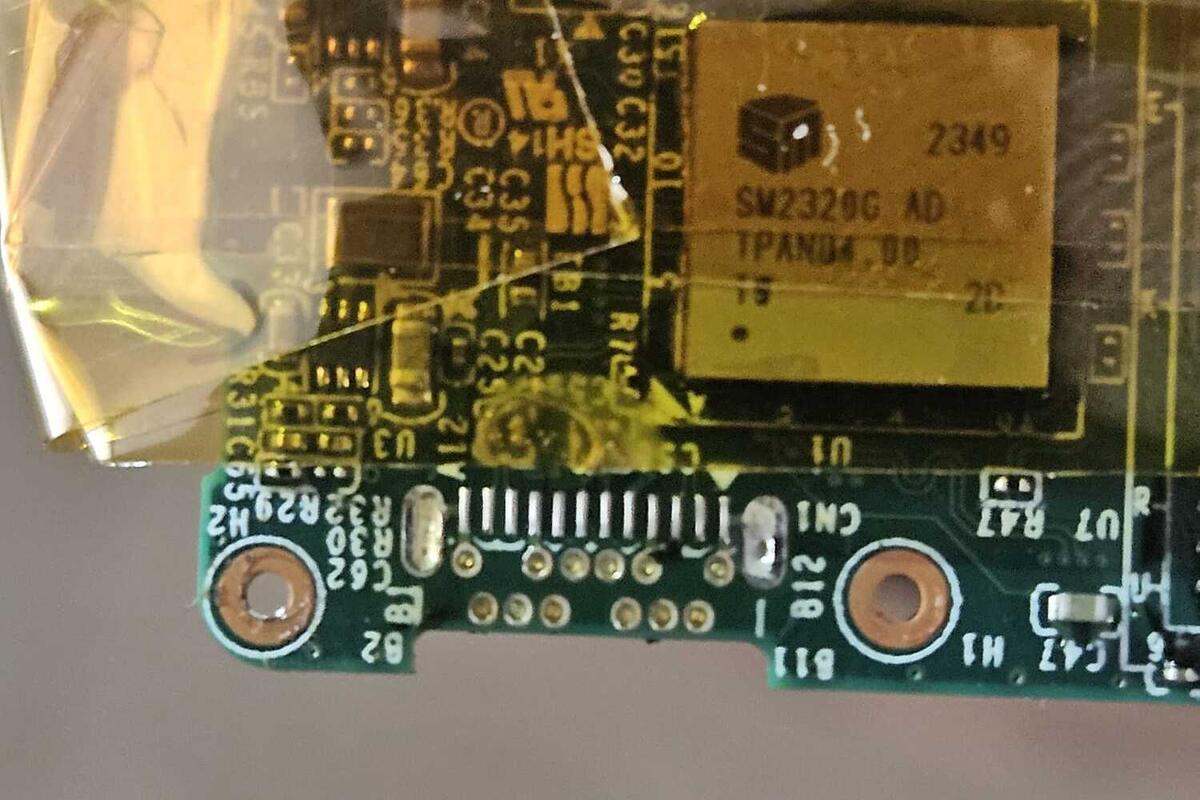
The board with the plug removed. The single row of surface-mount pads and the staggered through-holes beneath it are why a standard USB-C plug won't fit. Heat-resistant tape protects the controller while the plug comes off.
We looked hard for a replacement. Lexar don't sell the plug as a spare, and none of the common USB-C plugs match this footprint. The only real source is another Lexar Go, and a donor drive costs well over the price of the repair. So the plan changed from replacing the plug to repairing the original.
Inside the plug
A first reflow of the plug's joints got the drive reading again, but the plug was still stiff to insert, and a close look inside showed why. Some of the contacts had been pushed out of line by the knock. The owner's "crossed pins" were real.
The plug came off the board so the contacts could be worked on properly. They were straightened and cleaned one by one, off the board.
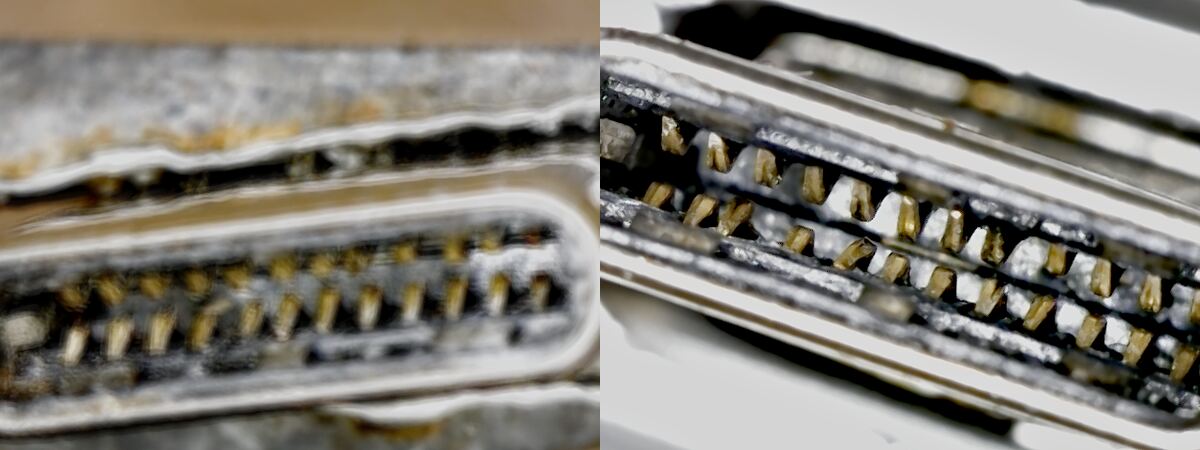
Inside the plug before (left) and after (right) the contacts were straightened.
Refitting it needed care, because the plug has to come back at exactly the right position and angle or it won't line up with the case opening. It was held in a USB-C coupler as a jig, the through-hole pins were soldered first to lock it in place, then the surface-mount row, with extra solder added to strengthen the joints.
Tested before anything else
With the plug back on, the drive was tested on a computer:
- Link speed: full 10 Gb/s, with the plug either way up.
- Read speed: around 750 to 780 MB/s.
- Wiggle test: a long transfer of over 19GB while the plug was deliberately moved around. The speed stayed flat with no dropouts.
- Data check: the same files read twice gave identical checksums.
The broken case, and the epoxy decision
One problem remained. The case had cracked around the plug opening, and that part of the case is what used to support the plug. Without it, every knock goes straight into the solder joints.
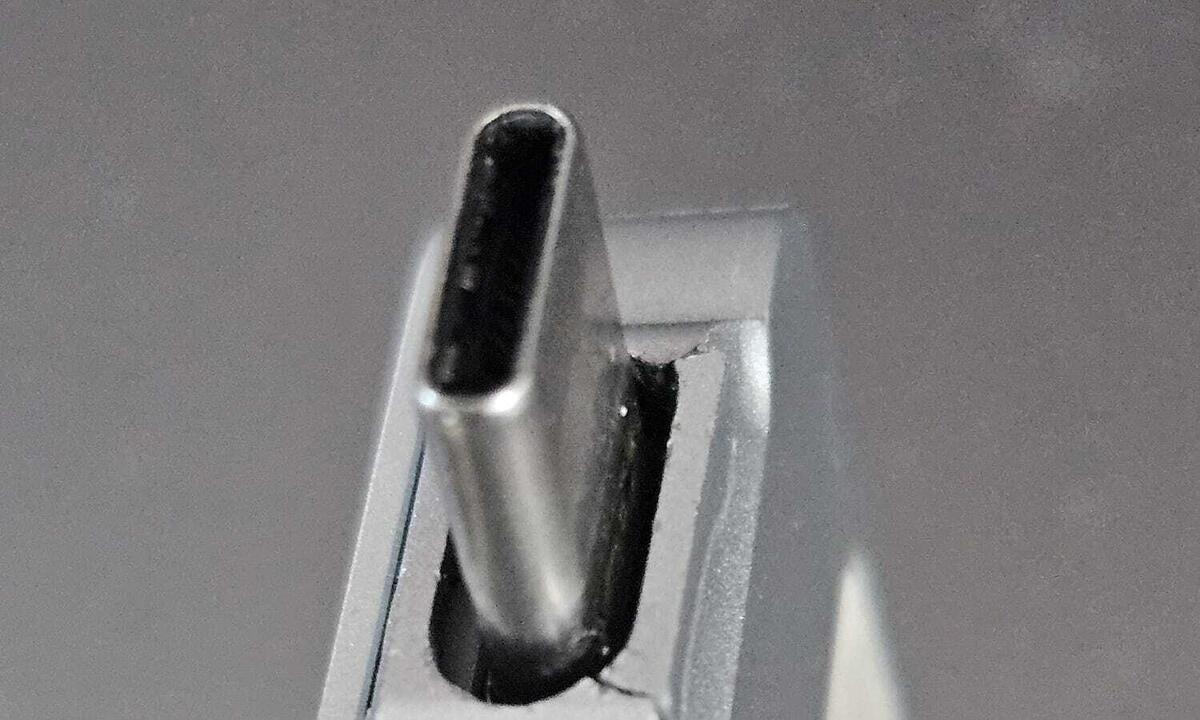
The crack in the case beside the plug opening.
The fix is a rigid epoxy around the base of the plug, locking it to the board so the joints don't take the strain. The catch is that it makes any future repair to the plug close to impossible. We explained the trade-off and left the decision with the owner. As the drive is used mainly as a backup, they chose the epoxy.
The epoxy goes around the base of the plug where it meets the board, not on the contacts, so plugging in and out works as normal. Once it had fully cured overnight, the drive was tested again: 10 Gb/s with the plug either way round, around 830 MB/s, no dropouts, and the files read back exactly the same on repeat passes.
An honest note
The plug's metal shell was bent in the original knock, so it still sits at a slight angle. It doesn't affect how the drive works, and we would rather say so than pretend it's as new. The drive went back by Royal Mail Tracked, with the owner's files untouched.
Questions about this repair
Can the USB-C plug on a Lexar Go SSD be replaced? Not with a new part. Lexar don't sell the plug as a spare, and standard USB-C plugs don't fit its footprint. The realistic repair is rebuilding the original plug, as here.
Will a repair affect the files on my drive? We only read from a drive to test it, and nothing is written to it. We don't offer data recovery, so tell us first if the data matters.
What if the case is cracked around the plug? The plug then relies on its solder joints alone. Epoxy around the base locks it in place, but makes any future plug repair very difficult. We explain the trade-off and you decide.
Got a portable SSD, speaker or other small device with a loose or damaged USB-C port? See our USB-C port repair service. If a part can't be bought, we'll tell you before any work starts, and look at whether the original can be saved.