
Nintendo Switch won't charge or turn on: bent port pin, new USB-C port and battery
At a glance
- Device: Nintendo Switch, original model
- Symptom: wouldn't charge or turn on, even on the genuine Nintendo charger
- Cause: a bent pin inside the USB-C port lying across its neighbours, and a battery drained to about 1V
- Fix: a new USB-C charging port, then a new 4310 mAh battery
- Result: boots to the Home menu and charges at 9V (8.95V, 1.25A)
- Service: UK-wide by post, with tracked return and a 12-month warranty on the work
This original Nintendo Switch arrived completely dead. It wouldn't charge and wouldn't turn on, even after being left on charge for a long time with the genuine Nintendo charger. It was booked in for our charging port repair.
Check before you replace
"Won't charge and won't turn on" usually means the charging port, but not always. The same symptom can come from a battery that has drained too far, or from a fault in the charging circuit on the main board. Those are different repairs, so the first job was to confirm the port really was the problem before fitting anything.
It was. One of the pins inside the USB-C port had been bent over and was lying across the pins next to it. A port in that state can't charge the console, and with no charge going in, the battery had run completely flat. That explains both symptoms.
The repair
- The main board was removed and the damaged USB-C port taken off.
- A new USB-C charging port was soldered onto the board.
- While it was open, the thermal paste on the processor was replaced and the fan was cleaned.
- The console was reassembled and put on charge.
It booted to the Home menu and charged normally from the new port.
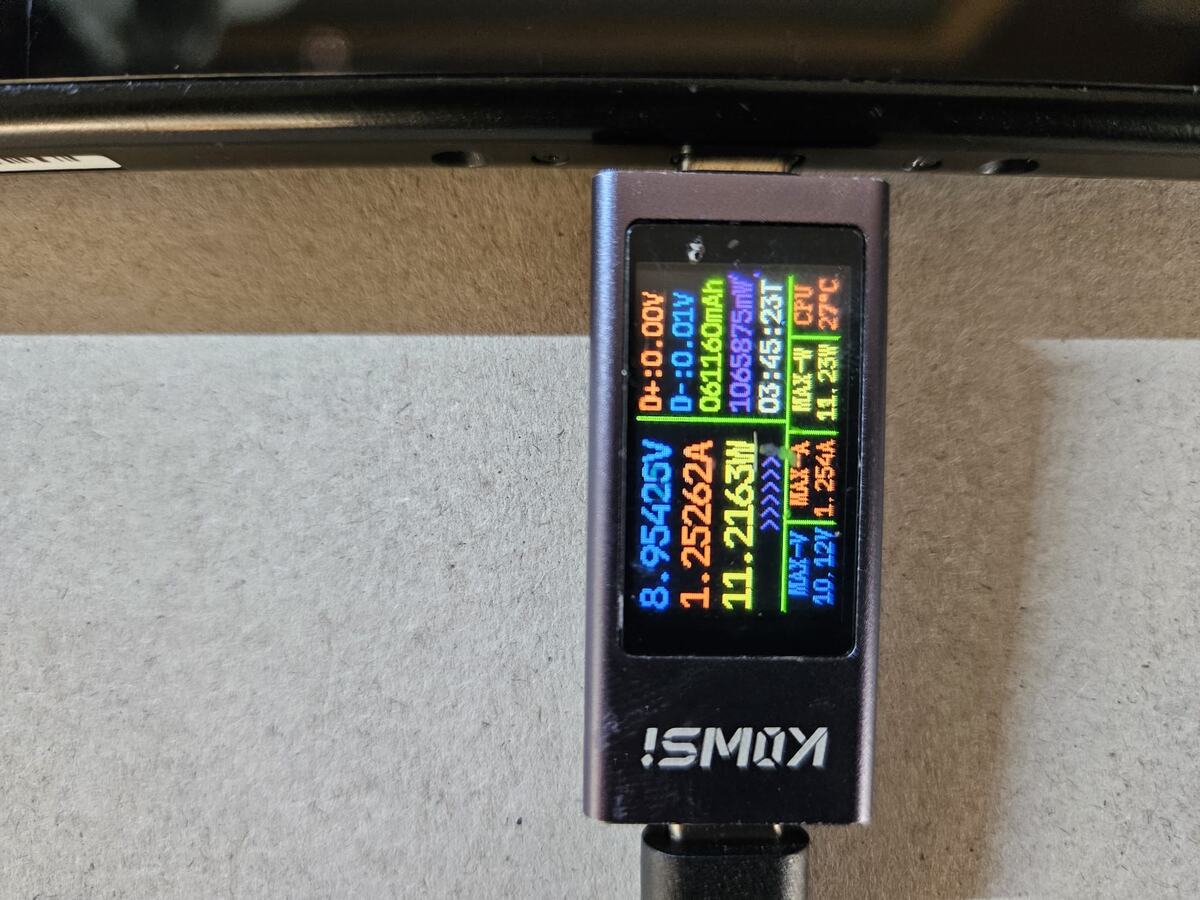
The new port on test: 8.95V at 1.25A, about 11.2W. The console and charger agreed on 9V fast charging, which needs the port's configuration pins working as well as its power pins.
The battery
There was one more problem. When the Switch arrived, its battery measured around 1V, completely drained. It took a charge again once the new port was in, but a lithium battery drained that far usually loses some of its capacity, so it may not last as long per charge as it used to.
We flagged it with the owner and recommended a new battery. With the console already open on the bench, it made sense to do it now rather than post it again later, and they agreed. A new 4310 mAh battery was fitted, and the Switch was checked again: it powers on, boots to the Home menu and charges from the new port.
Both the port and the battery replacement carry a 12-month warranty on the work, and the console went back by tracked post.
Why ports fail like this
A bent pin inside a USB-C port almost always comes from force: a plug pushed in at an angle, the console dropped while it's charging, or grit in the port. If your Switch suddenly stops charging, stop forcing plugs into it and get the port looked at. A bent pin can short across its neighbours, and the sooner it's dealt with the better.
Questions about this fault
Why won't my Switch charge or turn on? Most often a damaged charging port. A battery that has drained too far, or a fault in the charging circuit on the main board, can look exactly the same, so we confirm which it is before replacing anything.
How much is a Switch charging port repair? £69 flat, including tracked return postage. A battery replacement for the original Switch or Switch OLED is £55 flat.
Should the battery be replaced at the same time? If it has been drained completely flat, it's worth considering, and doing it while the console is already open saves a second round of postage.
Switch not charging, or battery not lasting like it used to? See our Nintendo Switch repair page for charging port and battery replacement.